

Project Management
Useful Links
Responsibilities
It is the responsibility of the Chief Product Officer (CPO) to manage and plan the work being conducted by the development team.
The CPO will account for the number of developers available in a given sprint to define the capacity. Each item planned will have an associated number of points assigned to it, to define an estimated sizing.
Planning
Scheduling & Sprint Planning
ESProfiler operates with a 2-week sprint cycle. Sprints are used for rough planning and timelines — they help us estimate capacity and sketch when work is likely to happen. They are not a hard boundary on what can be worked on.
The Development Board shows work across all sprints. Use the Iteration/Sprint filter on the left of the board to narrow the view when you need a particular sprint.
Sprints have the following structure:
- 2-weeks long
- Begin on a Monday
- End on a Friday
- Naming convention will be kept simple with a incremental number system, e.g.
Sprint 1,Sprint 2 - Capacity defined as a number of points.
We estimate capacity as the number of days available given any vacations, bank holidays, etc. that the team will be taking off. Then, given the capacity, we assign a set number of story points worth of work to the team, with the aim of completing that within the 2-week window.
Sprint Review
In the last days of the sprint, the project manger should keep a close eye on the progress of the planned items, in particular items sat "In Review" on the Development Board. These should be treated as priority and reviews should be chased.
Every other week the Engineering Team conduct a sprint review as part of our weekly retrospective meeting. The purpose of this review is to check-in on the progress of the planned items, validate sprint velocity and cover the major plans for the next sprint.
Sprint Velocity
We measure sprint velocity as the number of story points closed out in the two week sprint. The easiest place to find this data is in two places:
- Development Board Insights - shows a top-level view with a green line for planned items and a purple line for the closed/completed items.
- Development Board Kanban Board - Shows a breakdown of the status of items across all sprints. Use the Iteration/Sprint filter on the left to focus on a particular sprint. At the top of the columns you can see "Size (Points)" which will show you the number of story points for each status. This is useful where the first insights board shows X points closed; this view shows that Y may be in review (and therefore indicate how many more we could close with a limited amount of work).
The sprint velocity should be recorded in the retrospective meeting notes. If the sprint velocity is an outlier to previous sprints then it's worth an investigation on why.
Next Sprint Planning
This should be a high-level review of the upcoming items for the next two weeks. A valuable action here is to also mention the higher level items that each member of the team will be owning too.
Items planned for the next sprint can be found on the Next Sprint tab of the Development Board on GitHub. In addition to the pre-scheduled items, there will also likely be rollover of items that are unfinished from the current sprint too.
At the end of a sprint, use this view to migrate issues that were not started — still marked Todo — into the new sprint. The PM may temporarily change the filter on that view to also move some In Development or In Design items, then restore the default filter afterwards.
Meetings
Retrospective
Every Friday afternoon the Engineering Team will meet for a retrospective to review the week. Team members are encouraged to add items to the retrospective agenda in advance of the meeting.
The top-level of the retrospective includes:
- Management Updates: Any news, updates, or announcements from the management team.
- What went bad?: List items that went poorly this week. Try not to get into a blame-game. The key focus here is understanding what changes we can make to ensure it doesn't happen again.
- What can be improved?: List points of friction, something that annoyed you that didn't need too. Ideas for process improvements, automations, etc. Anything that can get the team operating more effectively.
- What went well?: List items that went well this week. Try to be positive and constructive, but also honest about what worked well. Praise and thank you team mates where it's deserved.
- Action Items: As the meeting progresses, list any action items that have been agreed upon to address the items that went poorly or could be improved.
- Sprint Review: Our sprint cadence is two weeks, so every other week we will conduct a sprint review.
Releases
TBC
Work Items / Issues
GitHub operates on the principle of an issue (formerly known as work items when we worked in Jira). These track individual pieces of work to be done by team members. They can represent larger roadmap items as part of product roadmap planning, down to small bugs reported on the platform.
Types
Each Issue has a "type", which helps us coordinate hierarchy and categorisation of issues.
- Initiatives: The Strategy. Long-term goals and ideas. These can be new applications, signficant feature sets, or other large-scale projects. These may not have fixed outcomes, and can evolve over time, but help define our long term roadmap.
- Story: The Delivery. A user-focused and scoped piece of work. These are generally requiring multiple elements to be implemented in order to be completed that would span across multiple projects, e.g. front-end and back-end services.
- Tasks: The Action. Focussed, sized, actionable items that have a clear, achievable outcome. These are scoped to single projects.
- Bugs: Issues that are reported by customers or internal users that need to be resolved.
Stories
Stories should contain a user-centric description of a feature or set of features that are to be implemented. They should follow the structure of:
As a [user persona], I want to [achieve a goal], So that [benefit to the user]
Stories should be unique, the I want statement especially should be something that the user cannot achieve right now, but can achieve with the Story being implemented.
Tasks
Tasks should be sized such that they are assignable and actionable by a single person. They are scoped to a single project.
Tasks should have enough detail in them so that whomever is assigned can start working on it immediately, and do so without needing additional context or clarification. If additional details are required, questions and comments should be added to the tasks themselves per our Asynchronous Communication guidelines.
Hierarchy
The hierarchy of work items is as follows, where the top-level item is the Initiative, and the bottom-level item is the Task. It is possible to have issues from the lower levels that do not have a parent item, e.g. a Bug report, or small chore task.
- Initiatives
- Stories
- Tasks / Bugs
In GitHub there is no enforcements of hierarchy, you can have Initiatives under other Initiatives, or Tasks directly under Initiatives too. This is fine, but generally speaking a "smaller" issue type should not be parent of a "larger" issue type, i.e. a Task being the parent of a Story.
Creating Issues
You can click the "+" button at the top-right of GitHub's navigation, then select "New Issue" in order to create a new Issue, or you can click the "New Issue" button in the top-right of the repository you are working in.
Issues should provide enough detail that they are actionable. If additional details are required, questions and comments should be added to the tasks themselves per our Asynchronous Communication guidelines, not in other communication channels, this ensures that other observers of the item also have access to the information.
New issues will automatically be added into the Development Board when created, and assigned the "Needs Triage" label so that the project management team can review and plan accordingly.
Repositories
On the home page of the ESProfiler Org, we have added a collection of quick links:
- + New Front-End Issue: Used for tracking an issues for front-end development in any of the projects/products
- + New Back-End Issue: Used for tracking an issues for front-end development in any of the projects/products
- + New Design Issue: If you need a visual asset created, or there is UX/UI work that needs to be done, please raise it here.
- + New Planning Issue: Any initiatives or stories that span across both front-end and back-end development resource.
- + New Admin Issue: Tasks that are not directly code-related, but are still tasks or initiatives that members of the team need to undertake.
- + New Website Issue: Whilst our website is managed through Webflow, if you spot problems on the public facing website, please raise them here.
If the issue you want to raise doesn't fit into any of these buckets, please search for an appropriate repository. If you still can't find an appropriate place, raise it with management.
Types
Each issue should be assigned one of the following types:
- Bug: Something isn't working.
- Initiative: A long-term goal or idea that is not yet scoped or defined.
- Story: A user-focused and scoped piece of work that is to be implemented.
- Task: A focussed, sized, actionable item that has a clear, achievable outcome.
Labels
Issues can be assigned labels to better distinguish items from one another and assist with filtering and prioritisation. The available labels in GitHub are:
- Front-End: This task involves front-end development work.
- Back-End: This task involves back-end development work.
- Needs Triage: This is a new item, and needs review from the project management team.
- Onboarding: This task covers work being done as part of onboarding a new customer, e.g. discovery
- Data: This task involved data-engineering or data-science work
- Documentation: Improvements or additions to internal or external documentation.
- Design: Visual or User Experience design task.
- Customer Request: An issue raised by a customer that needs to be addressed.
- Duplicate: This issue already has significant overlap with another, and should be closed as a duplicate.
Sizing Issues
Work items are sized in points. These are estimated sizings helped to provide guidance on how long items should take. These help with project planning and ensuring we have planned to our capacity. These do not set deadlines, and should be sized in isolation of other work items.
Initial sizings will be done at the Story level, then, when individual tasks are created, each task will have an associated number of points assigned to it, to provide a more accurate estimate of the total effort required.
Sizings should use the following scale:
- Tiny - 0.5: This is used for small, quick tasks that can be completed less than half a day.
- Extra Small - 1: Work items that are estimated to take about 1 day.
- Small - 2: Work items that are estimated to take about 2 days.
- Medium - 3: Work items that are estimated to take about 3 days.
- Large - 5: Work items that are estimated to take about 3-5 days.
- Extra Large - 8: Work items that are estimated to take about 5-8 days.
- Huge - 13: Work items that are estimated to take more than 8 days.
When creating issues, and sizing them, consider our company value, Iteration, Iteration, Iteration. We want to make sure work is broken down into smaller, achievable and measurable chunks.
Prioritisation
Each issue can be assigned a priority when attached to a project board to help product management and engineers decide where to focus their efforts when looking for new work to do. The priorities used are:
- Critical: This is used for urgent changes that require engineering to drop all other tasks. Most commonly this will be associated against platform-breaking problems that need to be resolved as soon as possible.
- High: These items should be front and center in Product Planning. This should be used for pulling attention to the most important items in sprint planning and the backlog.
- Medium: Should be getting into the product sooner rather than later, but there is not an immediate urgency.
- Low: (default) These are items are up for consideration, and could be addressed at some point, but there is no urgency.
Assigning Issues
The product management team will often assign larger issues to the appropriate team member based on the skills and availability of the team. This will also account for the points sizing of the issue, and the capacity of the team, to ensure a balanced workload across the team.
Items marked Up Next on the Development Board are the higher-priority, pressing items for a particular person. If you have items in that status assigned to you, treat those as the next work to pick up.
If, as a developer, you have finished your assigned tasks and are looking for the next item to work on, open the Available Work Items view on the Development Board. That list is the work to pick up next. If there are still no available tasks, reach out to the product management team.
GitHub Projects
A very useful feature in GitHub are Projects. They allow us to collate work from across our various repositories into a single view for project management purposes. Each Project can define it's own properties which any assigned issues can then inherit and define.
At ESProfiler, we have three primary Project Boards:
- Product Roadmap Board: Used for tracking the long-term roadmap of the product, focussing on Initiatives.
- Development Board: Used for tracking active development work across all sprints. Sprints on this board are for rough planning and timelines; filter by Iteration/Sprint on the left when you need a particular window.
- Changelog Entries: Used for tracking items that need a changelog entry on the website to advertise a newly added feature.
Product Roadmap Board
The Product Roadmap adds the following additional properties to an issue:
- Product Pillar: We use Product Pillars to help categorise development effort and our roadmap.
- Status: The current status of the issue, this is used to track the progress of the issue and is used to determine the next status.
- Sub-issue Progress: This is a built-in GitHub property that allows for tracking of progress on any child issues.
- Start Date: The date this work is scheduled to begin.
- Target Completion: The date we hope to have this issue concluded and deployed into production.
Product Roadmap Statuses
The available statuses for a given issue are:
- Under Consideration: This is a new item that has not been scoped or discussed yet
- Todo: This item has not yet been started
- Planned: This item has been scheduled on the Development Board
- In Design: Design (visual or UX) work on this item has started.
- In Development: Active development effort has started on this work item.
- On Hold: This item is blocked from progress by external factors, e.g. a dependency is not yet complete.
- Done: This item has no outstanding tasks remaining and is completed.
- Declined: Upon consideration from the planning team, this idea was declined, or has been cancelled.
Development Board
The Development Board shows work for all sprints. Use the Iteration/Sprint filter on the left of the board to focus on a particular sprint. The Available Work Items view lists items ready for developers to pick up when they are looking for their next piece of work. At the end of a sprint, this view is used to move unstarted (Todo) items into the next sprint; the PM can temporarily widen the filter to include In Development or In Design items as well.
The board adds the following additional properties to an issue:
- Sprint: The assigned Sprint used for rough planning and timelines. It is not a hard constraint on when the work can start.
- Status: The current status of the issue, this is used to track the progress of the issue and is used to determine the next status.
- Sub-issue Progress: This is a built-in GitHub property that allows for tracking of progress on any child issues.
- Size (Points): The estimated number of points this issue represents in resource planning. See our sizing guidelines for more information.
- Area: Which part/area of the product does this issue classify under, e.g. Discovery, Universal Framework Mapper, ESPi, Commercials
Development Board Statuses
- Todo: This item has not yet been started
- Up Next: A higher-priority, pressing item for a particular person. Use this to signal what they should pick up next among their assigned work.
- On Hold: This item is blocked from progress by external factors, e.g. a dependency is not yet complete.
- In Design: Design (visual or UX) work on this item has started.
- In Development: Active development effort has started on this work item.
- In Review: Initial development is complete, and the item is being reviewed for QA.
- In Staging: The solution to this issue is available to test in our Staging environment.
- Done: This item has no outstanding tasks remaining and is completed.
- Cancelled: This item has been cancelled and is no longer being worked on.
Changelog Board
The Changelog Board tracks features that have been (or are being) added to the product and need an equivalent changelog entry on our website.
Changelog entries are how we advertise new features to customers and the wider audience. When a new feature is shipped, the corresponding work item should be added to this board so that a concise changelog post can be published — ideally with screenshots, and focussed on the value being offered to users.
This board is separate from the Development Board. Completing the engineering work is not the same as advertising it; items stay on the Changelog Board until the website entry has been written and published.
Branching Strategy
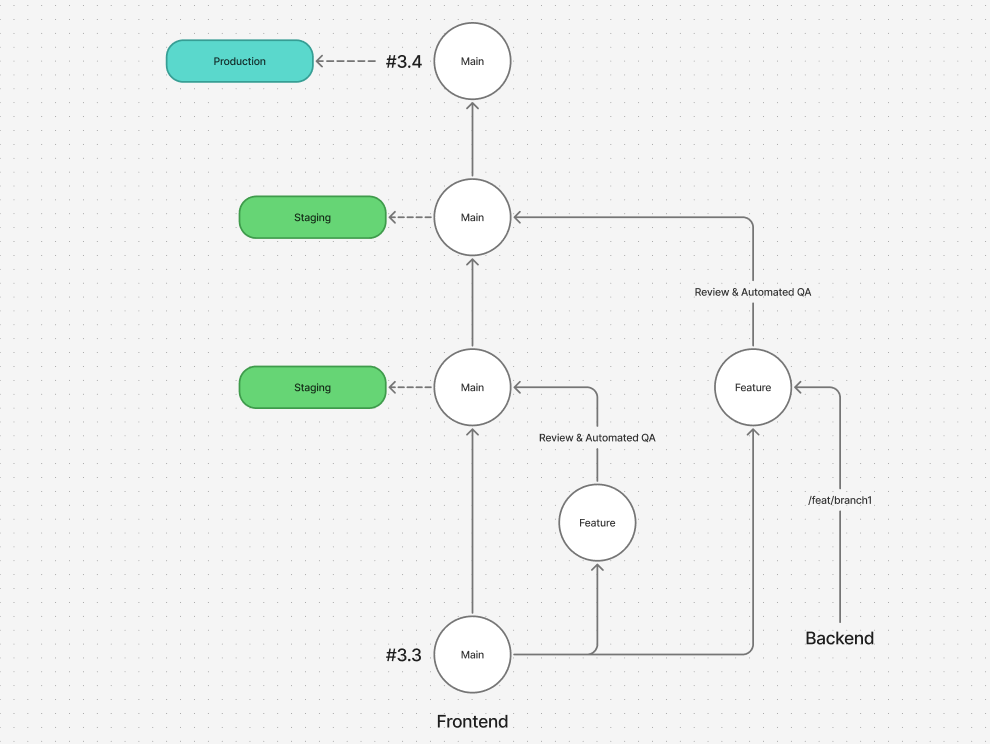 ESProfiler branching strategy
When working on a new feature or bug fix on a project you should use the following branching strategy to keep consistency with the development practices of the team:
- Create a new branch from the
mainbranch. - Use the issue number as the prefix for the branch name, e.g.
1234-add-new-featureor1234-fix-the-bug. The text should be a very top-level summary of the changes you are making, 2-3 words at most. - You can then create a pull request against the
mainbranch following the guidance below. - For larger features, you are advised to break down your work into multiple PRs for easier reviewing. For this, you can branch from your own feature-branch, and open PRs against that feature branch. Then once all reviewed and signed-off, open a PR against
main.
You can run "DevEnvPro" in order to pull from dependent branches you need, e.g. the main branch, or in-development branches for the back-end, if you're working from the front-end.
Releases are then conducted against the main branch, and utilising Git tagging to cut the release.
Closing Issues
Issues are considered completed when transitioned to the "Done" status and/or closed. For development tasks issues should have a 1:1 relationship with a Pull Request.
Linking a Pull Request
When you open a Pull Request in GitHub, you should always link it to the corresponding issue in GitHub. This can be done by adding the following text to the Pull Request description:
Closes ESPX-1234
If you want to simply link or reference an issue without closing the respective issue, you can just paste in the URL link to the issue. This will make a shortcut link, but not close the connected issue automatically.
Create Pull Requests
Pull Requests should be marked as "Draft" until the work item, and it's dependencies are complete and ready to go. A Pull Request should only be considered "Ready for Review" when it can be merged and pushed to the main branch.
Titles
Pull Reuest title should offer a one line summary of the changes made in the Pull Request. This should be a concise and to the point description of the changes made. Pull Request titles are automatically used in our generated release notes, so, at a glance should be a good summary of the changes made. There is no need to include reference to issues or work items in the title, e.g. #20 These are the changes I made.
Descriptions
Pull Request descriptions should provide a more detailed description of the changes made. This should include any additional context or information, especially for the assigned reviewer of the Pull Request to understand the changes made and the rationale behind them.
Linking & Closing Issues
Where possible, descriptions should include links to any relevant issues or work items that are related to the changes made. You should use the following phrases where appropriate:
- "Closes #20" - This will automatically close the issue when the Pull Request is merged.
- "Fixes #20" - This will automatically close the issue when the Pull Request is merged.
- "Part of #20" - This will create a link to the relevant issue, but not close it when this PR is merged.
You can use #XXX syntax if the issue is in the same repo as the PR, otherwise, you can just paste in the full URl pointing to the relevant issue, e.g. Closes <URL to Issue>.
Sizing Pull Requests
In the majority of cases, you do not need to "Assign" or add a sizing to a Pull Request. By linking to an issue, that is handled automatically.
However, for adhoc, often smaller pieces of work, where you may not have an issue to attach, you can instead do the following steps in order to attach story points to the work you have completed:
- Assign the PR to yourself
- Add the "Development Board" project
- Set the current iteration/sprint and assign an appropriate sizing in the Development Board panel.